
Miracle-Ear
Miracle-EarMedical
4.6517.00 Reviews
- Version
- 5.2.10(4)
- Installs
- 50.00K
- Age Rating
- Everyone
Screenshots
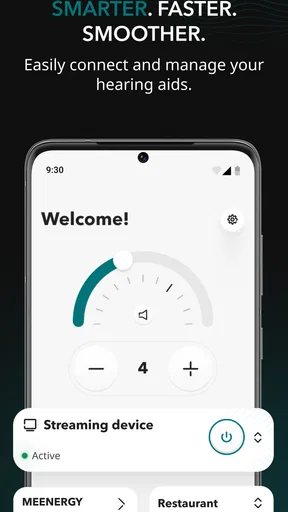
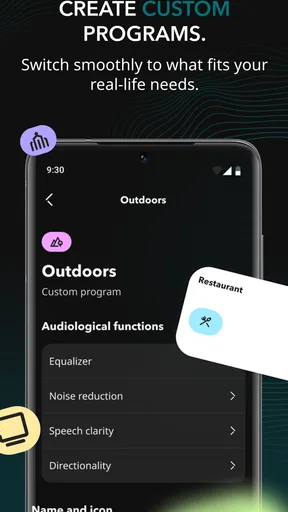
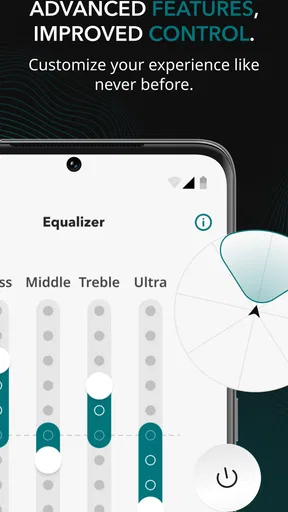
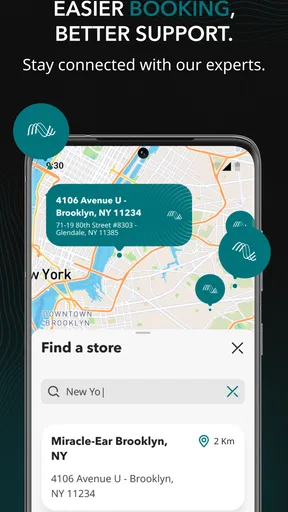
Our Review of Miracle-Ear
 Analysis by Appyee
Hearing support is one of those things you notice most when it is missing. A conversation in a busy café, a television playing softly in the next room, or a quick phone call can all become tiring when sound is difficult to follow. Miracle-Ear is designed as a medical companion for people who use or are considering Miracle-Ear hearing support, and after spending time with it, I found its main value in bringing hearing-related tasks into one place rather than leaving them scattered between appointments, phone settings, and guesswork.
The app is free, aimed at everyone, and developed by Miracle-Ear. Its store identity is straightforward: it is not presented as a general entertainment tool or a replacement for professional care, but as a personalized hearing companion. That distinction matters. I would not install it expecting a hearing test to settle a medical question or expecting a phone application to solve every listening problem. I would install it to make the everyday management of hearing support more organized and less intimidating.
Its current store rating is a 4.6 average from around 5.7 thousand ratings, with more than 500 reviews and over 50 thousand installs. Those figures suggest that it has found a real audience, although they do not tell me whether every user has the same hearing device, phone, or expectations. Hearing apps are especially dependent on that context. A smooth experience for one person can feel limited to another if their equipment or routine is different.
How Miracle-Ear fits into a real hearing routine
When I think about how this app fits into an actual hearing routine, I focus less on who holds the phone and more on whether the person using hearing support can repeat the steps confidently. A household can help make that routine familiar, but it should still leave the wearer in charge of choices about comfort and care. That distinction leads naturally to the practical question of how shared use should be handled.
A companion rather than a replacement for clinical care
The most useful way to think about this app is as a control and support layer around hearing care. It can help make the technology you already use feel more approachable, but it should not be treated as a diagnosis, an emergency service, or a substitute for an appointment with a hearing professional. That is not a weakness unique to this product; it is an important boundary for any medical app connected to hearing.
I appreciate that distinction because hearing difficulties are not always caused by the same thing. Background noise, earwax, a poorly fitted device, fatigue, a phone problem, and a genuine change in hearing can feel surprisingly similar in daily life. An app may help you notice a pattern or manage your setup, but it cannot responsibly explain every cause on its own. If sound suddenly changes, one-sided hearing loss appears, or discomfort becomes persistent, I would put professional advice ahead of experimenting with settings.
For ordinary use, the app makes the most sense for someone who wants a more consistent routine. Instead of waiting until a device becomes frustrating, I would use it when checking how hearing support behaves in different environments, preparing for a conversation, or trying to describe a recurring issue to a provider. That turns vague complaints such as “everything sounds wrong” into more useful observations about when and where the problem occurs.
What the current release tells me
The current version is 5.2.10(4), and the app was released on July 7, 2025. Those details place it in a relatively recent stage of its product life, so I would judge it as an actively positioned companion rather than an old utility that has simply been left in an app store. At the same time, a version number alone does not prove that every part of the experience has changed recently. I would separate what is visible today from what I might hope to see in later updates.
In practical terms, the recent release gives existing users a reason to keep the app updated, especially if they have encountered connection or compatibility friction. Medical companion apps often depend on the relationship between the phone, the app, and the hearing hardware, so staying current is sensible. I would still avoid updating immediately before an important trip or appointment if the app is central to my routine; I prefer to test the normal tasks first and make sure my familiar workflow still feels comfortable.
What I find encouraging is the product’s focused identity. Miracle-Ear is not trying to be a broad wellness dashboard filled with unrelated tracking. That focus can make a medical tool easier to understand, particularly for someone who is not confident with smartphone settings. The trade-off is that people looking for a complete hearing-health journal, extensive education, or broad integration with unrelated health services may find the experience narrower than a general health platform.
Why the first setup deserves patience
The first session is not the moment to rush. I would begin in a quiet room, keep the phone adequately charged, and have the hearing equipment nearby. If the app is being used alongside a compatible hearing device, the phone’s Bluetooth state and the device’s own power matter as much as the application itself. When a connection does not behave as expected, changing several things at once makes troubleshooting harder, so I would alter one variable at a time.
A useful habit is to establish a personal baseline. I would spend a few minutes in a quiet setting, then repeat the same listening task later in a noisier place. The goal is not to create a scientific measurement; it is to learn what “normal for me” feels like. That baseline makes it easier to recognize whether a later problem is connected to the environment, the phone, the hearing equipment, or a genuine change in comfort.
I would also keep expectations modest during setup. A hearing companion can make controls and support more accessible, but it cannot turn every phone into a professional fitting system. If a person expects automatic perfection in every room, disappointment is likely. If the expectation is clearer management and easier communication about problems, the app has a more realistic chance of being useful.
An everyday scenario where it earns its place
Imagine that I am visiting a relative for dinner. At home, my hearing is usually comfortable, but the restaurant has clattering plates, several conversations, and music in the background. Instead of deciding that the hearing support has suddenly failed, I would use the app as part of a simple process: notice the conditions, try the available control or support workflow, and compare the result after sitting in a quieter position.
The important benefit is not merely changing a setting. It is learning a repeatable response. I can note that crowded restaurants are difficult, that facing the speaker helps, and that a particular adjustment feels more comfortable. Later, that information gives me something concrete to discuss with a hearing professional. This is a more productive use of a companion app than repeatedly tapping controls without remembering what worked.
A similar routine can help during television viewing. If I keep increasing the volume because speech is hard to follow, I would first consider whether the issue is the program’s mix, the room’s acoustics, or my hearing support. I would try the app in a calm setting and compare speech clarity rather than judging success by loudness alone. Louder sound is not automatically clearer sound, and that distinction is easy to lose when using only the television remote.
What existing users may notice
For someone already familiar with Miracle-Ear services or hearing equipment, the main change is likely organizational rather than dramatic. A dedicated companion can reduce the need to remember scattered steps and can make the phone feel more connected to the hearing routine. That is particularly helpful for users who are comfortable with their devices but dislike navigating technical menus.
There is also a social benefit. When a hearing issue is difficult to explain, people often delay asking for help because they cannot describe it precisely. I would use the app to support a short record of situations: busy rooms, phone calls, television, outdoor noise, or discomfort after several hours. Even without turning that record into a formal medical chart, it can make a future conversation clearer and less emotional.
Family members may find the focused design easier to support than a collection of unrelated phone settings. If I were helping an older relative, I would avoid taking over completely. I would show them one or two repeatable actions, write down the simplest recovery step for a failed connection, and let them practice. Independence matters here; an app that only works when another person is present is not serving its full purpose.
On the other hand, experienced users who already have a reliable device-control routine may not feel a strong reason to change. If a person is satisfied with the manufacturer’s existing controls, a general Bluetooth workflow, and regular professional appointments, adding another app can create duplication. The value depends on whether Miracle-Ear’s companion reduces friction in that person’s actual day rather than merely adding another icon.
Three practical habits that improve the experience
- Keep a situation-based baseline. Compare quiet conversation, television, and a busy public setting separately. This prevents one difficult environment from making every other experience seem unsuccessful.
- Change one thing at a time. If I adjust the app, move seats, raise the television volume, and restart the phone together, I cannot tell what helped. A slower sequence produces better information for the next appointment.
- Use the app before frustration peaks. Checking the routine before leaving home is easier than troubleshooting in a crowded place. I would prepare for a restaurant, airport, or family gathering while calm, not once conversation has already become exhausting.
These habits are not flashy features, but they are where a companion app can become genuinely useful. The technology supports the routine; the routine creates the reliable benefit. Without that discipline, even a well-designed hearing tool can become something I open only when a problem has already become urgent.
Where the app may feel limited
The first limitation is that the experience is likely to be most valuable within the Miracle-Ear ecosystem. That is reasonable for a developer’s companion app, but it means I would check compatibility carefully before building my routine around it. If I use hearing equipment from another provider, or if my phone is old or configured unusually, the app may not offer the same practical value as it does for its intended audience.
The second limitation is the difference between convenience and clinical precision. App-based adjustments can be helpful for comfort, but they should not encourage endless self-tuning when the real issue is fit, maintenance, or a change in hearing. If I am constantly compensating for the same problem, that is a signal to seek professional input rather than continuing to push settings in one direction.
The third is cognitive load. A person who is already tired from listening may not want another series of menus, connection checks, or phone prompts. This is why I would evaluate the app by the number of steps required during a stressful moment, not by how impressive the feature list sounds. The best workflow is the one I can remember when I am in a noisy room and concentrating on another person.
Privacy and comfort also deserve a practical conversation. Medical apps can feel personal even when the user is only managing equipment. I would review the app’s permissions and privacy choices on my own device, keep the phone protected with its normal security settings, and avoid using shared devices for sensitive routines. I would not assume that every phone setting is ideal just because the app is from a familiar developer.
Who should use it, and who should choose something else?
I would recommend giving Miracle-Ear a serious look to people who already use Miracle-Ear hearing support, want a central companion on their phone, and prefer guided everyday management over digging through system settings. It may also suit a family member who is helping someone become more independent with hearing technology. The free price removes one common barrier to trying it, which is useful when a person is still deciding whether a dedicated companion improves their routine.
I would be more cautious for someone seeking a standalone hearing assessment. The app should not be the only basis for deciding whether hearing has worsened or whether a medical problem is present. I would also steer a person toward a broader health or accessibility solution if they need extensive cross-device tracking, detailed general wellness records, or support for equipment outside the Miracle-Ear environment.
It may not be the right choice for someone who rarely uses a smartphone, dislikes Bluetooth-dependent routines, or wants a completely passive experience. In that situation, direct help from a hearing professional or a simpler device-first approach may be less frustrating. Technology is useful only when it fits the person’s habits; asking a reluctant phone user to manage a new app can create more resistance than benefit.
What I would watch as the product evolves
Because the current release is 5.2.10(4), I would watch future updates for improvements that reduce the effort of common tasks rather than simply adding more options. The most meaningful progress would be clearer recovery when a connection fails, simpler explanations for hearing-related adjustments, and a smoother path from an everyday problem to a useful conversation with a professional.
I would also look for evidence that the app continues to serve both confident users and people who need extra guidance. Accessibility is not only about large controls or readable text. It is also about predictable navigation, understandable wording, and helping a user recover without feeling that they have broken something. Those details matter greatly in a medical companion, especially when hearing difficulty already makes communication tiring.
Another area worth watching is how well the app handles the boundary between personalization and overconfidence. Personal choices can improve comfort, but the app should encourage users to recognize when self-management has reached its limit. I would value reminders or guidance that support professional care without turning the experience into a stream of alarming messages.
Finally, I would judge future versions by whether they remain focused. More functions are not automatically better. A clean tool that helps me prepare, adjust responsibly, and explain recurring problems is more valuable than a crowded dashboard I rarely understand. The strongest evolution would preserve that clarity while making the important workflows faster.
My final take
After reviewing Miracle-Ear as a medical app, I see it as a practical companion for people who want hearing support to feel less isolated from the rest of their phone routine. Its strongest quality is focus: it gives the hearing experience a dedicated place instead of leaving users to improvise with volume buttons and general device menus. The free access also makes experimentation easier for people who are already within the intended ecosystem.
My recommendation comes with a clear condition: use it to manage and understand everyday hearing support, not to replace professional judgement. The app is most convincing when it helps me build repeatable habits, recognize environmental patterns, and communicate problems more clearly. It is less convincing if I expect it to diagnose me, guarantee perfect speech in every noisy setting, or work equally well with any hearing equipment.
For the right user, that is still a meaningful role. I would keep it on my phone if it made routine adjustments easier and helped me arrive at appointments with better observations. If my equipment were outside its intended ecosystem, or if I needed a broader medical tracking platform, I would compare other options first. The best reason to try it is not the promise of effortless hearing; it is the chance to make hearing care more manageable in ordinary life.
Verdict
Strengths of Miracle-Ear
- Personalized hearing solutions based on individual hearing needs.
- Remote support can make follow-up care more convenient.
- Helpful tools for tracking hearing device performance and usage.
- May improve communication in noisy environments with compatible devices.
- Simple interface designed for users who may not be tech experts.
Limitations of Miracle-Ear
- Many features require a compatible Miracle-Ear hearing device.
- Some services may depend on clinic availability and location.
- Bluetooth pairing can be inconsistent with certain smartphones.
- Advanced adjustments may still require an in-person appointment.
- App usefulness is limited for people without Miracle-Ear products.
Similar Picks in This Category
View All
WebMD: Symptom Checker
WebMD, LLC4.1

Microphone Amplifier
DOSA Apps4.2

Anatomy Learning - 3D Anatomy
3D Medical OU4.5

Period Tracker and Calendar
SimpleInnovation4.9

GoodRx: Prescription Coupons
GoodRx4.8

CVS Health
CVS Pharmacy4.5
Frequently Asked Questions
What is Miracle-Ear, and what can I do with the app?
Miracle-Ear is a companion app for compatible Miracle-Ear hearing aids. After pairing your devices, you can typically adjust volume, change listening programs, fine-tune sound preferences, check battery information, and access support resources from your phone. The exact features may vary depending on your hearing-aid model, smartphone, operating system, and region, so compatibility should be confirmed before downloading.
Which phones and hearing aids are compatible with Miracle-Ear?
Compatibility depends on the specific Miracle-Ear hearing aids and the phone you use. Many newer models connect through Bluetooth, while some features may require a particular Bluetooth version, operating system, or manufacturer-supported technology. Before installation, check the app listing and Miracle-Ear’s official compatibility information. Older hearing aids or unsupported phones may offer limited controls or may not connect at all.
Does Miracle-Ear replace a hearing professional or hearing test?
No. Miracle-Ear is designed to help manage compatible hearing aids and provide convenient access to settings and support, but it does not replace a hearing evaluation, medical diagnosis, or professional fitting. If you notice sudden hearing changes, pain, dizziness, discharge, or a significant decline in performance, contact a qualified hearing-care professional rather than relying only on app adjustments.
Do I need an internet connection or a Miracle-Ear account to use the app?
Some basic functions, such as controlling paired hearing aids, may work through the phone’s Bluetooth connection without continuous internet access. However, an internet connection may be needed for account features, updates, remote support, store information, troubleshooting content, or syncing preferences. Certain services can also require registration or sign-in. Requirements may differ by country, device model, and app version.
Is Miracle-Ear free to download, and are there additional costs?
The Miracle-Ear app is generally available to download without a separate purchase, but downloading it does not include hearing aids or professional services. Costs may apply for the hearing devices, fitting appointments, repairs, accessories, replacement parts, or optional support services. Mobile data charges may also apply when using cellular internet. Review the official listing and local Miracle-Ear provider terms for current pricing.
